Passkeys in practice: safer sign-in, recovery, and account lifecycle
 Founder · Domain Strategist · Author20 Oct 2026 · 19 min read

In this article · 11 sections
- The cryptographic model: what the server sees
- Discoverability changes the login journey
- Synchronised and device-bound passkeys
- Enrolment is an account-binding ceremony
- Recovery is a second authentication system
- Account portability needs product decisions
- Accessibility is part of security
- Enterprise policy: choose properties, not labels
- Migration pitfalls and a practical rollout
- Conclusion: make the credential lifecycle the product
- References and further reading
Passkeys are easiest to understand as a change in what a service asks a person to prove. Instead of asking for a shared secret that the person remembers and types, the service asks an authenticator to sign a fresh challenge with a private key. The service stores the corresponding public key. The private key is unlocked locally, commonly with a device PIN, pattern, fingerprint, face recognition, or security-key gesture; the biometric comparison, where used, is performed by the device rather than sent to the website. The result is a sign-in that does not require the user to disclose a reusable secret.
That description is deliberately less magical than much passkey advertising. A passkey is not a new protocol, and it is not synonymous with biometrics. It is a user-facing name for a passwordless FIDO credential. On the web, the browser API is WebAuthn, part of the FIDO2 family alongside the Client to Authenticator Protocol (CTAP), which lets a browser or operating system communicate with an authenticator. The FIDO Alliance’s passkey definition includes both credentials synchronised by a credential manager and credentials that remain bound to one device. Those categories have different operational consequences.
This article reflects standards and product documentation available on 20 October 2026. WebAuthn is a standard; the way a particular operating system, browser, password manager, identity provider, or enterprise policy stores and moves a credential is implementation-specific and can change. The right deployment question is therefore not “Are passkeys secure?” It is “Which passkey properties does this account need, and how will the service manage enrolment, recovery, portability, and retirement?”
The cryptographic model: what the server sees
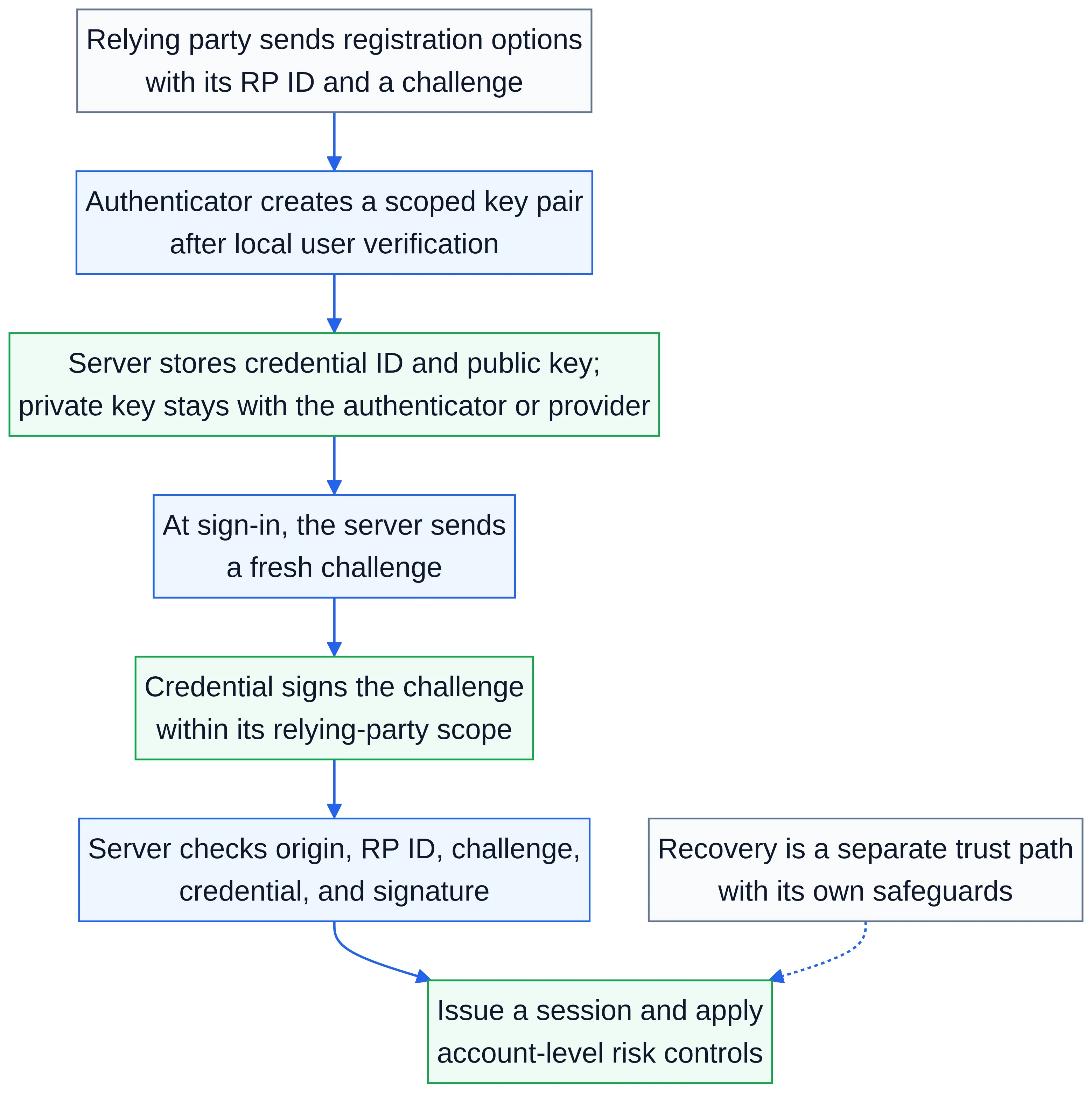
During registration, the relying party (RP)—the website or application asking for authentication—creates a one-time challenge and sends it to the browser or native client with registration options. The authenticator generates a key pair for that RP. The client returns a credential ID, a public key, and signed registration data. The RP validates the response and stores the public key with the account. The private key stays under the authenticator’s control. This is the core flow described by WebAuthn Level 3 and illustrated in Apple’s native passkey documentation.
At authentication, the RP sends another unpredictable challenge. The authenticator signs the challenge and relevant client data with the private key after obtaining the user’s consent or verification. The RP checks the signature against the stored public key, confirms that the challenge is the one it issued, validates the expected relying-party identifier, and checks the authenticator data and policy requirements. A practical summary of these server-side checks appears in MDN’s Web Authentication API guide; a production implementation should use a maintained server library and follow its verification rules rather than reimplementing cryptography.
The public-key arrangement changes the breach story. A database dump can expose credential IDs and public keys, but those values do not let an attacker sign a new challenge. There is no password hash to crack or password to replay. The service still has valuable account data, and an attacker who takes over an already authenticated session can still act within that session. Passkeys reduce one class of credential theft; they do not replace authorization controls, session protection, fraud detection, or careful account-recovery design.
The security property that matters most against remote phishing is verifier-name binding, often called origin binding in practical explanations. The credential is created for a specific RP identifier and the browser supplies the origin context. A deceptive site cannot normally use the credential registered for the real site, even if the user is persuaded to visit it. NIST SP 800-63B Revision 4 identifies WebAuthn as an example of phishing resistance through verifier-name binding. This is stronger than asking a user to read a domain name while entering a password or typing a one-time code.
“Phishing-resistant” does not mean “attack-proof.” A criminal can still steal a session cookie, trick a person into approving a legitimate transaction, compromise an endpoint, abuse a weak recovery route, or persuade a help-desk agent to reset an account. A service can also accidentally weaken a passkey rollout by leaving an easy password or SMS fallback enabled for high-risk actions. Describe the protection precisely: passkeys make the credential exchange resistant to a remote impostor site; the surrounding account lifecycle determines how much of that protection survives an attack.
Discoverability changes the login journey
WebAuthn supports discoverable credentials, historically called resident keys, and non-discoverable credentials. A discoverable credential stores enough information with the authenticator for the client to find credentials for an RP without first receiving a credential ID from the server. A non-discoverable credential generally requires the user to identify the account first, after which the RP supplies the relevant credential IDs. MDN’s explanation describes the distinction and its effect on account selection.
Passkeys, in the FIDO usage of the term, are discoverable credentials. That makes an identifier-first login optional: a user can focus a username field and let the browser offer available passkeys, or choose a passkey before entering an email address. WebAuthn calls the quiet version of this experience conditional mediation. A site can request it while retaining a conventional username field, commonly using autocomplete="username webauthn"; the browser shows a credential only when the user interacts with the field and a suitable credential exists. This lets a migration offer passwords and passkeys without forcing a confusing “choose your method” screen on every visit.
Discoverability is also a data-model issue. The authenticator associates a user handle and display information with the credential, while the server associates the credential ID and public key with an account. Usernames and display names can change; accounts can be merged or deleted; a credential can remain in a manager after the server-side record is removed. WebAuthn Level 3 and browser APIs include mechanisms for an RP to signal current credential state to a credential store. MDN documents these signals, including the important constraint that a complete list of accepted credential IDs should only be sent after the user is authenticated.
A discoverable credential is not automatically a credential that syncs. Discoverability describes how the credential is located at sign-in. Synchronisation describes whether the credential or its protected key material becomes available through a provider on other devices. Treat these as separate design decisions. Confusing them produces bad explanations and incorrect policy.
Synchronised and device-bound passkeys
A synchronised passkey is made available across a user’s devices through a credential manager or passkey provider. The provider may encrypt the credential before synchronisation and require the user to authenticate on a new device before making it usable. Google documents this model for Google Password Manager and compatible third-party managers in its passkeys developer documentation. Apple documents its own platform integration through iCloud Keychain in Supporting passkeys. These are examples of provider behaviour, not a promise that every manager uses the same recovery, encryption, or device-approval process.
A device-bound passkey remains on the device or external authenticator where it was created. A FIDO security key is the clearest example. The credential can still be used on another computer when the key is connected by USB, NFC, or another supported transport, but the private key is not copied into that computer’s credential store. Passkey Central’s passkey-type guidance uses “device-bound” for credentials that do not sync elsewhere and notes that security keys may carry attestation information about the authenticator.
The trade-off is not “safe versus unsafe.” Both types use public-key authentication and can provide verifier-name binding. Synchronised credentials improve continuity when people replace or lose a device, and they can make broad adoption practical. A device-bound key narrows the places where the private key can exist and can support stronger provenance or hardware policy, but loss, damage, inventory, shipping, spare-key, and help-desk problems become more consequential. A provider that syncs a passkey also becomes part of the account’s trust and recovery boundary.
Do not infer portability from the word “passkey.” Synchronised credentials are portable within the provider ecosystem and subject to its account and device recovery rules. A security key can be physically carried between ecosystems but requires possession of that key and compatible transports. A platform-bound credential may be portable only through a cross-device ceremony, such as approving a QR-code flow with a nearby phone; that is not the same as copying the private key to the laptop.
Attestation is another commonly confused term. It can provide evidence about an authenticator model or provenance during registration, where a policy needs that evidence. It does not prove that every future use is safe, and it is not generally available for synchronised passkeys. Microsoft’s Entra documentation describes an enterprise-specific rule in which enforcing attestation excludes synced passkeys. That is a product policy, not a universal WebAuthn requirement. Use attestation only when a concrete risk or assurance requirement justifies the privacy, compatibility, and support cost.
NIST’s assurance language is more prescriptive at its highest level. SP 800-63B Revision 4 requires a non-exportable private key and hardware protection for AAL3 and says syncable authenticators cannot be used at AAL3. A team mapping its system to NIST should assess its exact authenticator and assurance level; it should not label all passkeys “AAL3” or treat a product’s “end-to-end encrypted” description as proof of non-exportability.
Enrolment is an account-binding ceremony
The safest registration flow starts from an account that has already been authenticated at an appropriate level. Ask the server for a fresh challenge, present a clear account name and RP, call WebAuthn with discoverability and user-verification preferences that match the policy, and send the result to the server for verification. Store the credential ID, public key, user handle, sign-counter state where applicable, backup eligibility and backup state when exposed by the implementation, authenticator metadata that policy actually needs, creation time, last-used time, and a human-readable label such as “work laptop” or “security key.” The WebAuthn specification defines the registration ceremony; the label and lifecycle records are application design.
Require user verification when the account or operation needs it, and record what the authenticator reports rather than assuming that a biometric was used. A local PIN or pattern may be the activation factor. A fingerprint or face check may unlock the same device-held key. The server normally receives an assertion about successful user verification, not the biometric template. Explain this plainly in the UI: the site is not receiving the user’s fingerprint or face, and a person can select an available local unlock method.
Make registration explicit. A button such as “Create a passkey” should explain which account is being protected and should not appear to silently create a credential after an unrelated click. On success, show the label and provide a way to add another passkey. On cancellation or unsupported-device errors, preserve the existing sign-in path and give a next step. Avoid telling users that a passkey was created until the server has verified and stored the returned credential.
Encourage more than one authenticator before removing a password. For a consumer account, that may mean a synchronised passkey plus a second passkey in another manager or a security key. For a workforce account, it may mean a managed primary credential and a spare hardware key held according to the organization's controls. NIST recommends maintaining at least two separate means of authentication to reduce recovery pressure. “Add another passkey” is a lifecycle feature, not an optional afterthought.
Enrollment should be resistant to account-injection mistakes. Require a current authenticated session, reauthentication for adding a credential when the action is sensitive, and a notification when a credential is added or removed. For an enterprise, bind enrollment to the identity-provider account and device posture policy where appropriate, but do not assume that the browser can attest to every property of a personal device. Keep a clear audit record without storing unnecessary device fingerprints.
 Open the full-size diagram
Recovery is a second authentication system
The common migration error is to spend months replacing passwords and then leave an unprotected “lost passkey” route that sends a link to any email address or accepts a support call with weak questions. Recovery is not a user-experience exception to authentication; it is another authentication ceremony with its own threat model.
Start by separating three events. Credential replacement adds or replaces a passkey after the person has authenticated with another trusted authenticator. Device recovery restores access to a credential manager or obtains a synchronised credential on a new device. Account recovery re-establishes control when the normal authenticators are unavailable. The first two may be handled by platform or provider workflows; the third is controlled by the RP and must be evaluated independently.
For synchronised passkeys, document the provider’s process: what is needed to unlock the manager, how a new device is approved, which account or recovery factors can reset that provider, and what happens if the provider account is lost. Do not present “the passkey is backed up” as equivalent to “the RP can recover the account.” The RP receives a public key and has no power to reconstruct the private key. The user must regain access to an existing credential or complete the RP’s recovery process.
For device-bound passkeys, register a spare before it is needed. A second security key stored in a controlled location may be appropriate for an administrator, while a consumer service might offer a second platform or security-key credential. If the account has no remaining authenticator, recovery may require a verified contact channel, previously issued recovery codes, a support review, an organizational identity proofing process, or some combination. Each option can be attacked. Set a delay or additional review for high-impact changes, notify existing channels, revoke lost credentials, and give the user a way to report a fraudulent recovery.
Recovery should not silently downgrade the account forever. If a recovery event permits a new passkey, require the user to finish enrollment, display active authenticators, and expire or review temporary fallback methods. For high-value accounts, consider a two-person administrative process or a documented identity-proofing step rather than an agent deciding from caller confidence. Do not claim that security keys eliminate recovery risk; they reduce reliance on recoverable secrets only when the organization supplies spare keys and a workable replacement process. FIDO’s enterprise deployment guidance makes this distinction between provider-defined recovery for synced credentials and RP-defined recovery for device-bound credentials.
Account portability needs product decisions
Users may change phones, browsers, operating systems, credential managers, employers, or the email address that identifies an account. WebAuthn does not define a universal export format that lets an RP move a private key from one provider to another. The RP’s portable asset is the account and its registered public keys; the user’s ability to sign in depends on whether a credential remains available.
Design for portability in layers. First, support a passkey on any standards-compatible client rather than writing a flow that assumes one vendor’s sheet or a specific biometric. Second, support cross-device authentication where the platform exposes it, while explaining that the user approves on a nearby device and the credential is not necessarily copied to the new one. Third, let a signed-in user add a new authenticator before removing an old one. Fourth, retain a recovery method that is usable without the old device but held to the account’s risk level.
A service that uses a stable internal account identifier should not use the display name or email address as the only identity key. During sign-in, a discoverable credential may return a user handle or account hint. Resolve that value to the server-side account, then use the credential ID and stored public key for verification. When an email address changes, update display information and credential labels deliberately; do not delete the credential merely because a label is stale.
For enterprise tenants, portability includes employment changes and delegated administration. Decide whether a worker may register a personal synchronised passkey, whether a managed security key is required for privileged roles, and how access is revoked when the person leaves. Revoking a public key at the RP does not erase a copy held by a credential provider, but it prevents that credential from authenticating to the RP. Offboarding therefore needs both server-side revocation and provider or device-management actions where the organization controls them.
Accessibility is part of security
A passkey can reduce memory and transcription burdens, but a biometric sensor, touchscreen, camera, QR code, or phone is not universally available or comfortable. A user may have a motor, visual, hearing, cognitive, or situational limitation; may use assistive technology; or may be on a device without the expected sensor. Provide more than one supported route without forcing everyone into the weakest route.
The WCAG 2.2 accessible-authentication guidance says that a cognitive function test, such as remembering a password or transcribing a code, needs an alternative or an assisting mechanism. It also treats the entire multi-step process and recovery path as relevant. That means a polished passkey prompt does not excuse a recovery form that requires recalling obscure answers, manually typing a code from another device, or defeating a password manager.
Use semantic controls, visible focus, meaningful status messages, and an error path that can be completed with keyboard and screen-reader technology. Do not require a user to identify whether a prompt appeared on a phone by sight alone. For cross-device flows, provide clear text instructions and a non-QR alternative. Allow external security keys, platform PINs, and other supported authenticator modalities where the user’s environment permits them. Test with real assistive technology and with users who cannot use the preferred modality; automated accessibility checks will not reveal every failure in a native credential sheet.
Accessibility also argues against an abrupt password shutdown. A person may need time to obtain a compatible key, change a device setting, or use an approved manager. Keep a supported fallback during migration, but make its risk and sunset date explicit. “Passkey-only” should be a policy outcome reached after compatibility and recovery testing, not a slogan that leaves a group of users locked out.
Enterprise policy: choose properties, not labels
An enterprise policy should describe the properties required for each population and action. A low-risk workforce application may accept synchronised passkeys because broad availability and recoverability matter most. A privileged administrator, signing authority, or regulated workflow may require device-bound hardware, user verification, attestation, managed inventory, and a spare key. A single tenant may need both profiles.
Document at least these questions:
- Which threats are in scope? Remote phishing, malware on managed endpoints, theft of a physical key, insider misuse, provider compromise, and social-engineering recovery have different controls.
- What assurance is required? Map the policy to the organization’s standard or regulation. If NIST AAL3 is the target, apply its non-exportability and hardware requirements rather than assuming a consumer syncable passkey qualifies.
- Which credential types are allowed? Define whether synced, device-bound platform, and external security-key credentials are accepted for each role. State whether attestation is required and why.
- How will enrollment be authorized? Specify the existing authenticator, reauthentication, device-management checks, approval workflow, notification, and audit fields.
- How will loss and offboarding work? Define spare-key issuance, revocation timing, help-desk evidence, emergency access, and provider/device-management actions.
- What is the accessibility and exception process? An exception should provide an equivalent risk-controlled route, not a permanent unmanaged bypass.
Attestation deserves restraint. It can be valuable when a policy needs a specific authenticator model or certification evidence, but it reduces interoperability and may reveal device information. Many synchronized passkeys cannot provide the evidence an attestation policy expects. Start with user verification, phishing resistance, lifecycle controls, and strong recovery; add attestation for a stated decision, not because a registration response contains an optional field.
Monitor the system as an authentication service. Track registration completion, cancellation and error categories, sign-in success by client family, authenticator additions and removals, recovery events, fallback use, and time to replace a lost credential. Do not turn a vendor’s published conversion or speed figure into an internal target without reproducing its population, protocol, and measurement method. Product documentation can explain capability; only an organization’s own privacy-reviewed telemetry can explain its deployment.
Migration pitfalls and a practical rollout
The first pitfall is treating passkeys as a password reset. A passkey does not automatically prove that the person who creates it owns the intended account. Require an existing authenticated session or a separately verified enrollment transaction. The second is storing only a username and assuming it will identify every future assertion. Store and verify the credential ID, public key, user handle, RP ID, challenge, origin, and policy-relevant flags.
The third pitfall is getting the RP ID or origin wrong. Subdomains, staging environments, native app association, reverse proxies, and internationalized domains need an explicit plan. A credential registered for one RP scope cannot simply be used for an unrelated origin. Test production-like HTTPS, redirects, embedded contexts, browser privacy settings, and native associated-domain configuration. Apple’s documentation, for example, requires an associated domain for its native passkey requests; that requirement is specific to the platform API, while WebAuthn’s RP and origin rules remain standards concerns.
The fourth pitfall is launching a discoverable flow without deciding how account selection works. If multiple people share a device, show account information carefully and do not leak a list of accounts to an unauthenticated page. If conditional mediation is unavailable, provide a conventional button and a usable identifier-first fallback. If the user selects a credential that the server no longer recognizes, handle it as a stale credential, not as a generic “wrong password”; use the supported credential-state signal where appropriate.
The fifth is assuming that every authenticator gives the same signals. Backup eligibility, backup state, user verification, resident-key behavior, transports, counters, and attestation are interpreted by platform and authenticator combinations. Treat flags as evidence for a policy, not as a universal product label. Keep implementation decisions close to the WebAuthn library and test matrix, and log enough structured error information to distinguish user cancellation from an actual verifier failure.
The sixth is leaving fallback methods stronger than the new method. SMS and email codes remain phishable. A password that can reset a passkey is still a password-based account takeover path. Decide which fallback is acceptable for which action, rate-limit it, notify on use, and require stronger reauthentication before changing authenticators, recovery contacts, payment details, or administrator privileges. Removing every fallback on day one can create lockouts; keeping every fallback indefinitely can make the passkey decorative.
A disciplined rollout can be staged:
- Inventory: list clients, browsers, account types, privileged actions, existing factors, recovery channels, accessibility needs, and regional constraints.
- Choose profiles: select accepted credential properties for ordinary users, administrators, service operators, and exceptional cases. Decide whether synchronized and device-bound credentials have different rules.
- Build the lifecycle: implement registration, assertion verification, labeling, add/remove, replacement, recovery, revocation, notifications, audit, and support tooling before broad promotion.
- Pilot: test with representative devices, third-party credential managers, security keys, shared computers, private browsing, managed browsers, native apps, and assistive technology. Measure failure reasons rather than only completion.
- Migrate gradually: offer passkeys through conditional UI, teach users what local unlock means, retain a controlled fallback, and invite a second authenticator. Set a review date for fallback retirement.
- Operate: monitor stale credentials, recovery abuse, provider changes, browser regressions, and offboarding. Re-test after platform or identity-provider updates.
The implementation boundary should be equally clear. The RP owns account identity, challenge generation, server verification, authorization, credential inventory, recovery policy, revocation, and audit. The browser and operating system own much of the user-facing authenticator interaction. The passkey provider owns its storage, synchronisation, and provider-account recovery behavior. A secure deployment makes those responsibilities visible instead of treating “the passkey” as one opaque feature.
Conclusion: make the credential lifecycle the product
Passkeys improve sign-in because public-key authentication removes the shared secret that phishing pages and breached password stores are built to capture. WebAuthn supplies the browser-facing ceremonies and verifier binding; it does not choose the organization’s recovery policy, accessibility commitments, or acceptable assurance level. Synchronised and device-bound credentials are both legitimate passkey designs, but they optimize different failure modes.
A durable deployment starts with the account lifecycle: bind a credential only after an appropriate sign-in, verify challenges and origins correctly, make discoverable credentials understandable, register more than one authenticator, provide accessible alternatives, design recovery as carefully as authentication, and revoke credentials when circumstances change. Decide where portability is needed and where device binding is worth its operational cost. Then migrate in stages, measuring real failures and retiring weaker fallbacks only when the replacement is usable for the people who depend on the service.
References and further reading
- W3C, “Web Authentication: An API for accessing Public Key Credentials — Level 3”
- FIDO Alliance, “Passkeys”
- FIDO Alliance, “FIDO Deploying Passkeys in the Enterprise — Introduction”
- NIST, “Digital Identity Guidelines: Authentication and Authenticator Management (SP 800-63B Revision 4)”
- Google for Developers, “Passkeys”
- Microsoft Learn, “Authentication methods in Microsoft Entra ID — passkeys (FIDO2)”
- Apple Developer Documentation, “Supporting passkeys”
- W3C WAI, “Understanding Success Criterion 3.3.8: Accessible Authentication (Minimum)”
- MDN Web Docs, “Web Authentication API”
- FIDO Passkey Central, “Passkey Types”

The Domain Control Plane: DNSSEC, Registrar Security and Resilient Brand Infrastructure
Protect brand infrastructure across registrar accounts, DNS delegation, DNSSEC, certificates and email with a resilient domain-control-plane framework.

Preparing for post-quantum cryptography: a practical migration plan
Plan post-quantum cryptography migration through inventory, risk prioritization, hybrid testing, PKI dependencies and safe rollback.

Confidential computing: what hardware isolation protects—and what it does not
Learn what confidential computing and hardware enclaves protect, how attestation and key release work, and where their security limits remain.